

For a small service business, a sensible starting point is one complete journey—from a client request to its resolution. Payments, live chat and AI can come later if the work calls for them.
This guide will help you decide what belongs in that first release, what to test and whether an existing product could meet your needs.
Choose the client task before choosing the features
Look at a recent piece of work that involved several emails or a spreadsheet. Where did it get stuck?
Perhaps the client sent an incomplete brief. A colleague shared an outdated file. Or work waited because nobody knew who could approve it.
Write down one sentence:
“Our client needs to [complete an action], so our team can [take the next step].”
For example: “Our client needs to approve the current event programme, so our team can prepare it for publication.”
That sentence gives the portal a purpose. It also helps you question proposed features: will they help this journey work?
If clients only need an occasional file, a well-managed shared folder may be enough. If they repeatedly need documents, decisions and updates connected to the same piece of work, a portal becomes more worth considering.
Our client portal development page explains how we approach that scope.
Six client portal features to consider first
Use this table to assess your chosen journey. You may not need a separate screen or tool for every row.
| Capability | What the client needs | What your team must be able to manage |
|---|---|---|
| Accounts and permissions | Access to their organisation’s work | Invitations, roles and removal of access |
| Requests and forms | A clear way to submit the required information | Review incomplete requests and assign responsibility |
| Documents and versions | The correct file, with enough context to use it | Upload, replace and distinguish current from superseded versions |
| Status and approvals | A clear next action and a record of their decision | Decide who can approve and what happens after a revision |
| Notifications | A useful alert when action is needed | Recipients, reminders and delivery failures |
| Staff administration | Help when something goes wrong | Correct records, resolve exceptions and answer access questions |
Make permissions more specific than “client” and “admin”
A client organisation may have someone who uploads documents and someone else who approves them. Your own staff may need different access too.
Write down who can view, change, download and approve each kind of record. Include what happens when a person leaves the organisation or a project ends.
A login screen alone does not establish those boundaries. Permission checks must also apply to the underlying requests and files, as explained in OWASP’s access-control guidance.
Ask your developer to demonstrate access separation using test accounts from two different organisations.
Make every status tell the reader what happens next
“In progress” can hide several different situations.
More useful labels might be “Waiting for your brief,” “Under review by our team” or “Ready for your approval.” Each should make the next action and its owner understandable.
Show when information was last updated. If a status comes from another system, decide how to handle a delayed update rather than presenting old information as current.
A worked example: approving an event programme
This is an illustrative planning example, not a Zyndix client case study.
Imagine an event-production business that prepares programmes for its customers. The organiser supplies speaker details, the production team creates a draft, and a named customer contact approves it.
A first release could work like this:
| Step | What happens | What must remain clear |
|---|---|---|
| 1. Submit details | The organiser provides speaker names and session information | Which required details are still missing |
| 2. Prepare a draft | The production team uploads programme version 1 | The draft belongs to the correct event and customer |
| 3. Request review | The nominated contact receives a link | Which version they are being asked to review |
| 4. Record a decision | The contact approves it or requests changes | Who decided, when and on which version |
| 5. Revise if needed | The team uploads version 2 | Approval of version 1 does not silently approve version 2 |
| 6. Complete the work | The approved version becomes the final deliverable | Everyone can identify the final file and its approval record |

The revision rule is particularly useful to settle before development. Without it, an “Approved” badge can become ambiguous as soon as somebody replaces the document.
This journey does not automatically require a chat system, payment processing or an AI assistant. Comments attached to the specific draft may be sufficient.
It does require a staff view. Someone must be able to handle a wrong upload, change the nominated reviewer and help a customer who cannot access the request.
Decide where each piece of information belongs
A portal can look finished while creating extra administration behind the scenes.
Before connecting your tools, make a small ownership map:
| Information | Example system responsible for it | Portal’s job |
|---|---|---|
| Customer organisation and contact | Existing CRM | Display the appropriate details |
| Programme draft and approval | Portal’s project record | Store versions and the review decision |
| Invoice and payment status | Accounting system | Show the relevant status or link, if needed |
These are example choices. Your business may need a different arrangement.
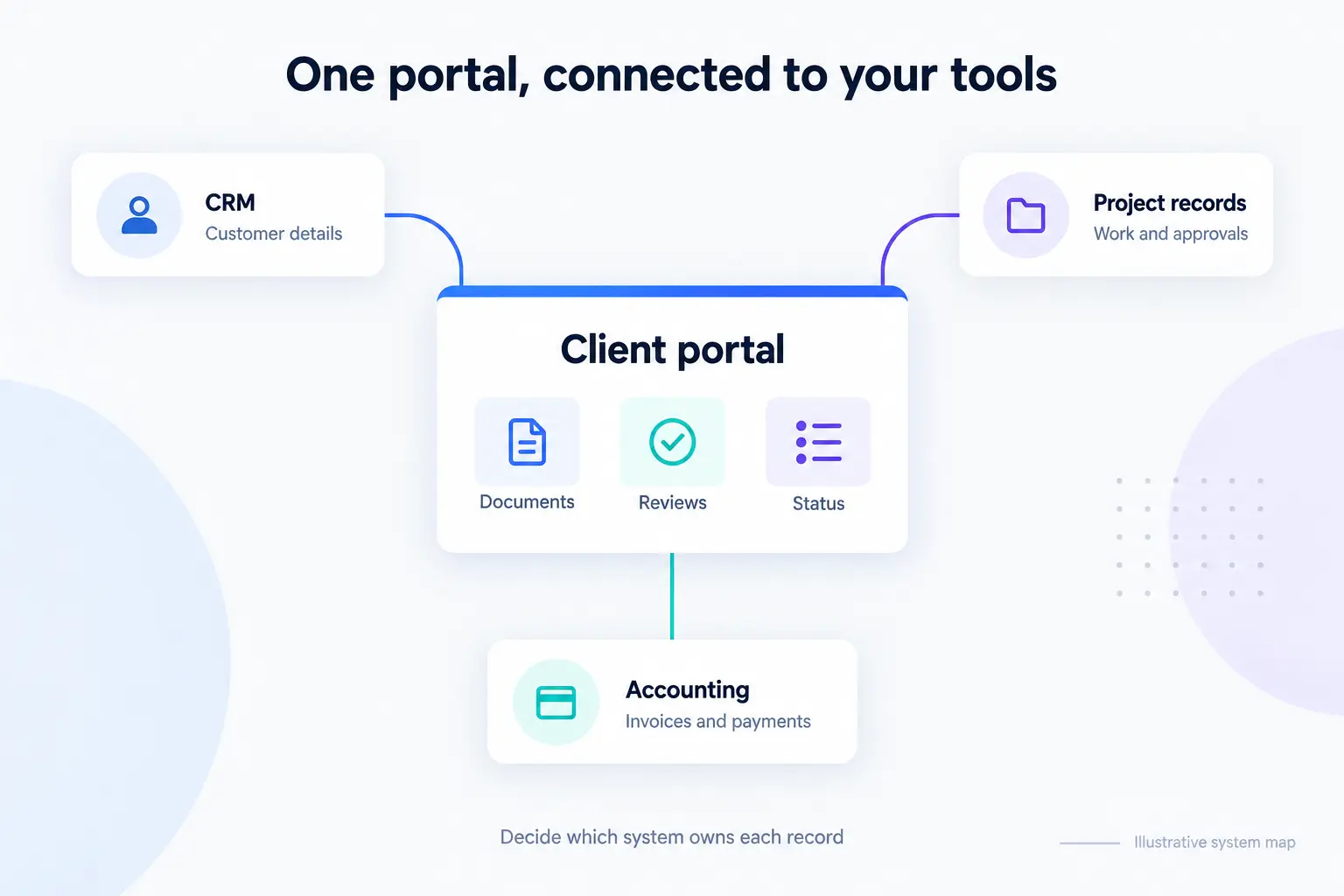
For each connection, agree which system can change the information, what moves in each direction and who handles failures. Check that the provider’s API access and subscription support the proposed connection.
For example, if an approval is recorded but the update to your project-management tool fails, your team needs to see the failure and recover it without asking the client to approve again.
This is where workflow automation connects the portal to the work your team already does.
Buy an existing portal or build a custom one?
Test an existing product against your actual journey before deciding to commission software.
| An existing product may fit when… | Custom development may be worth investigating when… |
|---|---|
| Its standard requests, files and approval process match your work | Your approval rules or organisation structure need a different process |
| Its permissions fit the people involved | Access depends on relationships or records it cannot adequately represent |
| Its available connections cover the required tools | An essential integration is missing or too limited |
| You can accept its interface and operating limits | Those limits prevent clients or staff from completing important work |
There is also a middle option: configure an existing system and build only the missing connection or interface.
Compare the ongoing responsibilities as well as the initial price. Consider subscriptions, setup, integrations, data migration, support, maintenance and how you would export your records if you changed systems.
Our custom software development service covers how we define and build applications around these requirements.
A related example is Scholarcert, the certificate platform we built. It demonstrates our application and integration work. It is our own product, rather than evidence that we have already delivered the portal described in this guide.
What can wait until later?
Put a proposed feature on the later list if you cannot connect it to a specific problem in your first client journey.
Common candidates include:
- Live chat: add it when a conversation needs to happen there and someone can respond.
- Payments: add them when collecting payment is part of the journey; check whether a link to your existing payment process would suffice.
- AI assistance: consider it once there is a defined task, suitable information and a way to handle errors.
- Advanced reporting: start with the information people need to act. More charts do not necessarily help them complete the task.
- A separate mobile app: first test whether the journey works well in a mobile browser.
“Later” should not include the controls needed for your initial scope. Access restrictions, understandable errors, usable forms, recovery arrangements and a support owner belong in the release plan.
Client portal launch checklist
Ask someone who did not design the portal to complete the journey without a demonstration. Use test data and accounts.
Record the problems and fix them before widening the pilot.
After launch, track whether clients finish the chosen task, where they ask for help and how much staff handling remains. Compare that with your starting process. Logins alone will not tell you whether the portal is useful.
Questions before you commission a portal
How much does a custom client portal cost?
A useful estimate depends on the journey, permissions, integrations, existing data and support requirements. Prepare a short scope covering those items and ask for initial development and ongoing costs separately. A headline price without that context is difficult to compare.
Can a portal connect to our CRM?
Often, but the exact connection depends on the CRM’s API, permissions and subscription. Specify which records need to move and which system controls changes. Ask the developer to verify access before treating the integration as agreed.
How long does it take to build?
The scope and dependencies determine the schedule. Data cleanup, access to other systems and review decisions can affect it alongside development. Ask for milestones tied to a working client journey and its testing, rather than a promise based only on the number of screens.
Do our clients need another username and password?
They need an appropriate way to access protected information, but the sign-in method is a design decision. Consider the clients’ existing accounts, invitation process, recovery needs and data requirements. Test the experience with representative users.
Can the portal use our own branding?
Yes, a custom portal can be designed around your visual identity. Existing products may also offer branding options; check the plan and any limits on domains, emails and page layouts. Make sure clients can recognise your business and understand the next action before spending time on decorative customisation.
Should we include AI in the first version?
Only if it solves a defined problem that the first release needs to address. A portal for submitting files and approving work may work well without it. Add AI when you can explain its job, what information it may use and when a person should take over.
Bring one client workflow to the conversation
You do not need a finished specification to discuss a portal.
Bring one example of the work: the request you receive, the documents involved, who approves it and the tools your team uses. Remove private client information from anything you share.
We can discuss whether an existing product, a small integration or a custom portal is worth exploring—and what a useful first version could include.
Free 30-minute project conversation with Zyndix.

Amirhossein builds custom software, AI agents and workflow automations at Zyndix.